
Boost your online presence with our expert Internet Marketing Service.


Latest Blogs

Improve Your Email Marketing Results for These Critical KPIs
Email marketing is one of the most important tools to generate more leads and sales for your business, yet few […]
7 Simple Ways to Secure Your WordPress Site
With over 50,000 websites being hacked daily—yes, daily—it’s not a question of if your WordPress website will be targeted, but […]
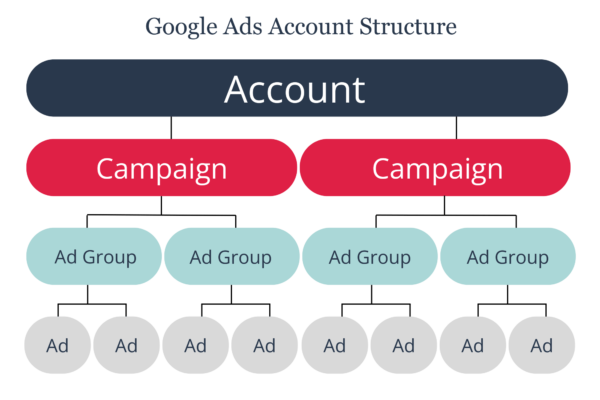
Building Your Google Ads Account Structure Like a City Planner
Are you looking to stop wasteful spending, drive more qualified traffic to your website, and generate a better ROI for […]
COMPARING EXPERT AI CONTENT WRITING SOFTWARE FOR LOCAL BUSINESSES AND SMALL SHOPS
Local businesses and small shops operate on tight margins, limited marketing budgets, and the need to connect with nearby customers quickly and effectively. AI content writing software promises to help create blog posts, product descriptions, social media updates, and SEO-friendly pages at scale and with less effort. But with a crowded market of tools, how do you choose the right one for your unique needs? This article breaks down the essential criteria, compares popular options, and offers a practical framework so a small business can pick an AI writing partner that fits its goals, budget, and workflow.
WHY AI CONTENT MATTERS FOR LOCAL BUSINESSES
– Quick, consistent content: Local shops benefit from regular updates—seasonal menus, promotions, neighborhood guides, and service tutorials. AI tools can generate drafts fast, helping you publish more often without burning out your team.
– SEO on a budget: Well-structured content, local keywords, and optimized meta clues can improve visibility for “near me” and neighborhood searches. AI platforms often include SEO templates or integration with SEO tools, giving you a cheaper path to competitive pages.
– Brand consistency: With a defined voice and templates, AI content helps maintain a uniform tone across blogs, product pages, and social posts—even if multiple staff members contribute.
– Reallocation of time: For small teams, AI can take over repetitive writing tasks, freeing up human editors to focus on strategy, image decisions, customer interaction, and high-impact campaigns.
– Accessibility and experimentation: AI can help test different headlines, pain points, and offers with minimal risk, guiding your content strategy based on what resonates locally.
KEY CRITERIA TO COMPARE AI WRITING TOOLS
– Ease of use: Is the interface intuitive for non-writers? Can you generate useful content after a short onboarding?
– Content quality and control: How natural and accurate are the outputs? Can you tune tone, style, and level of detail? Are there robust editing and rewriting options?
– Templates and use cases: Do you get templates for blog posts, product descriptions, landing pages, meta descriptions, call-to-action copy, and social media posts? Are there templates tailored to local businesses (menus, services, neighborhood guides, events)?
– SEO features: Does the tool offer keyword suggestions, content briefs, page structure guidance, and meta description generation? Can it help you optimize readability and on-page SEO (H1s, subheads, internal linking prompts)?
– Local-business fit: Does it support location-based content, NAP (Name, Address, Phone) consistency prompts, and schema markup guidance? Can it help create service area pages or neighborhood guides?
– Integrations and publishing: Can you export clean copy, push directly to your CMS (WordPress, Shopify, Square Online, etc.), or publish to social media calendars? Does it integrate with popular SEO and analytics tools?
– Collaboration and governance: Can multiple team members work on drafts? Is there a workflow for approvals, tone customization, and brand guidelines?
– Language and tone control: If you need multilingual content or a consistent brand voice, does the tool support this well?
– Data privacy and ownership: Do you own the content you generate? Are there opt-outs to prevent your data from being used to train models?
– Pricing and value: Do the pricing tiers fit a small business budget? Are there usage caps, word counts, or add-on costs for premium features?
– Support and onboarding: Is there guided onboarding, tutorials, templates, or customer support when you’re stuck?
TOP AI WRITING TOOLS FOR LOCAL BUSINESSES (AT A GLANCE)
Note: Features can vary by plan and may change over time. Always verify current offerings on official sites and take advantage of free trials.
– Jasper (formerly Jarvis)
– Strengths: Robust long-form writing capabilities, a wide range of templates (blogs, product pages, ads, emails), tone and style controls, frequent updates, and a large content-generation community.
– Local business fit: Good for blog content, service pages, and neighborhood guides; supports SEO-oriented outputs with templates.
– Considerations: Higher-tier plans may be needed for consistent, high-volume output; some users report a learning curve to unlock the best templates.
– Best for: Shops that publish frequent blogs, need a broad set of templates, and want consistent brand voice across formats.
– Copy.ai
– Strengths: Very approachable, quick starter templates, social media copy, product descriptions, and landing page copy. Generous free trial and affordable entry plans.
– Local business fit: Useful for fast social posts, promotional content, and short-form site copy; can generate multiple variants to test local offers.
– Considerations: May require more human editing for nuanced or highly technical content; fewer long-form templates than some competitors.
– Best for: Small shops needing fast, inexpensive content across multiple channels.
– Writesonic
– Strengths: Rich set of templates for blogs, product descriptions, ads, emails, and landing pages; built-in SEO assistance and content briefs; WordPress integration available.
– Local business fit: Excellent for turning around product pages and landing pages aimed at local searchers; can generate meta descriptions and internal linking prompts.
– Considerations: Some users report variability in tone depending on the prompt; mid-range pricing with a range of usage options.
– Best for: Shops that want a balance of long-form content and marketing copy with reliable publishing workflows.
– Rytr
– Strengths: Ultra-affordable entry pricing, straightforward interface, rapid content generation for short-form pieces; supports multiple languages.
– Local business fit: Good for quick product descriptions, social posts, and short blog snippets; lower cost per use makes it attractive for micro-businesses.
– Considerations: Long-form content quality can be less consistent than top-tier tools; fewer advanced SEO-focused features on some plans.
– Best for: Budget-conscious small businesses needing lightweight content generation.
– Frase
– Strengths: Strong emphasis on content research and SEO-driven writing, with content briefs, topic discovery, and question-based content ideas; integrates with Surfer SEO for optimization.
– Local business fit: Great for in-depth local guides, service pages, FAQs, and topic clusters that target local intent.
– Considerations: More SEO-focused, which is excellent if you want to optimize pages proactively; may require some experimentation to align with non-SEO content goals.
– Best for: Shops investing in a robust, SEO-first local content strategy.
– Surfer SEO + AI pairing (not a single-tool writer, but a common combo)
– Strengths: Excellent for on-page optimization, keyword density guidelines, and live content audits; AI writing features can draft content within SEO constraints.
– Local business fit: Ideal for ensuring pages are optimized for local search while maintaining readability.
– Considerations: Requires a separate content generation workflow; best when paired with a dedicated AI writing assistant.
– Best for: Shops that want to tightly couple content creation with SEO performance.
DETAILED COMPARISON BY NEEDS
SEO-FOCUSED CONTENT
– Tools with built-in SEO templates and briefs can reduce the guesswork for local pages: Reads like a plan. Look for keyword suggestions, headings optimized for search intent, meta description generation, and the ability to export SEO-friendly outlines.
– Local schema and NAP consistency support: Some tools offer prompts or templates to create service area pages, local landing pages, and FAQ structured data. If your business relies on local visibility, prioritize tools with strong local-support features and schema guidance.
– Content briefs and topic clustering: Tools that help you identify content gaps around local queries (e.g., “best pizza near me,” “car repair in [Neighborhood]”) can accelerate your strategy.
EASE OF USE AND SPEED
– A clean UI with drag-and-drop templates, one-click re-writes, and prompt presets reduces time-to-first-draft.
– Short learning curves matter for small teams. Look for guided onboarding, example prompts tailored to your industry, and a responsive support channel.
TEMPLATES TAILORED TO LOCAL BUSINESSES
– Restaurant and cafe templates (menus, specials, seasonal updates, local events)
– Retail product descriptions and category pages
– Service providers (plumbers, electricians) with service pages and FAQs
– Real estate neighborhood guides and agent bios
– Local blog formats (neighborhood guides, event roundups, how-to posts for local residents)
LANGUAGE, TONE, AND BRAND VOICE
– If your local business has a distinct voice, you’ll want tools with tone controls and brand presets, plus the ability to save and reuse voice templates.
– Multilingual support can be a factor if you serve diverse neighborhoods.
DATA OWNERSHIP AND PRIVACY
– Ensure you retain ownership of generated content and understand whether the platform uses your data to improve its models. For privacy-conscious shops, check for explicit opt-outs and data residency options, especially if you collect customer data in content creation workflows.
INTEGRATIONS AND PUBLISHING WORKFLOWS
– Direct CMS integrations (WordPress, Shopify) and publishing pipelines save time. Check if the tool can push drafts to your CMS, auto-generate meta data, or feed content plans into your social media scheduler.
– Collaboration features (multi-user access, approval workflows, version history) help teams stay aligned.
PRICING AND VALUE
– Entry-level plans can be very affordable, but owners should evaluate word quotas, monthly output limits, and the cost of add-ons like SEO features or additional local templates.
– Consider whether you need long-form capabilities (blog posts and guides) or primarily short-form assets (social posts, meta descriptions). A plan that fits your typical volume will offer the best ROI.
– Free trials and money-back guarantees are valuable to test real-world usefulness before committing.
PROJECT-BASED USE CASES FOR LOCAL SHOPS
– Case 1: A neighborhood cafe wants weekly blog posts, daily social updates, and optimized menu pages. A tool with strong short-form templates, local SEO prompts, and CMS publishing integrations will reduce workload and improve local search visibility.
– Case 2: A family-owned hardware store needs service-area pages, how-to guides, and product descriptions for e-commerce. A solution with robust templates for product descriptions, local guides, and a good balance of SEO features is ideal.
– Case 3: A boutique hotel or bed-and-breakfast wants local content about landmarks, events, and regional guides. A tool that can handle long-form travel writing while maintaining brand voice and integrating with travel/booking pages is valuable.
– Case 4: A real estate team requires neighborhood guides, agent bios, and blog posts about market trends. Frase or SEO-first tools paired with a writing assistant can help create authoritative content that ranks locally.
IMPLEMENTATION PLAN: STARTING SMALL WITH EFFECTIVE RESULTS
1) Define goals and content types
– List your top local queries and the types of content that map to them (blogs, service pages, menu descriptions, social posts).
– Decide on a target publishing cadence (e.g., 2 blog posts per month, 3–5 social posts per week, updated product descriptions quarterly).
2) Pick 2–3 tools for a trial
– Choose tools that cover your primary needs (long-form content, local SEO support, and CMS publishing).
– Use free trials or low-cost plans to test.
3) Create brand and content guidelines
– Prepare a clear brand voice doc, tone guidelines, and a checklist for editorial standards (accuracy of local facts, contact details, hours, promotions).
– Build a small library of prompts that align with your templates and goals.
4) Run a 4-week pilot
– Week 1: Generate drafts using templates; edit in-house or with a freelance editor.
– Week 2–3: Publish content to your site and social channels; measure engagement and SEO signals.
– Week 4: Review performance, adjust prompts and templates, and decide which tool to continue with.
5) Measure ROI
– Track metrics such as organic traffic to local pages, time-on-page, bounce rate, conversion of visitors to inquiries or sales, and social engagement.
– Compare the effort saved (time, staff hours) against the cost of the tool to determine ROI.
BEST PRACTICES FOR LOCAL SEO CONTENT USING AI
– Start with solid content briefs: Before generation, outline your target keywords, intent, and page structure. A strong brief reduces the need for post-editing.
– Prioritize local intent: Include neighborhood names, city references, and local landmarks to capture “near me” queries and neighborhood searches.
– Maintain NAP accuracy: Your business name, address, and phone number should be consistent across the site. Use templates that prompt for updated contact information on location pages and promotions.
– Use schema markup guidance: Where possible, add localBusiness schema and serviceArea schema to improve rich results in search.
– Create internal linking opportunities: AI can suggest related local pages to link to, improving site structure and SEO value.
– Balance automation with human editors: AI can draft, but human verification preserves accuracy, brand voice, and factual correctness, especially on hours, addresses, phone numbers, and promotions.
– Iterate content with performance data: Use analytics to identify which topics and formats drive local traffic and inquiries, then optimize prompts accordingly.
WHAT TO DO IF YOU ARE STILL UNSURE
– Start with a no-risk trial: Many vendors offer trials or money-back guarantees. Use them to validate whether the tool meets your local business needs.
– Consider a hybrid approach: Use AI for bulk drafting and human editors for the final polish, especially for critical pages like service-area pages or case studies.
– Focus on the essentials first: Don’t try to automate every type of content at once. Prioritize high-impact areas like your homepage, local service pages, and main blog posts.
– Check for ongoing updates: AI tools evolve quickly. A vendor that continuously improves templates, SEO features, and integrations will deliver sustained value.
RISKS AND LIMITATIONS TO REMEMBER
– Content quality can vary: AI-generated drafts may require fact-checking and editing for accuracy, tone consistency, and relevance to a local audience.
– Over-reliance on templates can flatten your content: Mix template-based outputs with personalized storytelling and real customer insights.
– Data privacy concerns: Ensure you understand how your data is used and stored, especially if you are collecting customer information during the content creation workflow.
– Platform dependence: If your CMS or marketing stack changes, you may need to adapt your AI tool integrations or workflows.
FINAL THOUGHTS: CHOOSING THE RIGHT TOOL FOR YOUR LOCAL BUSINESS
There is no one-size-fits-all “best” AI content writing software for local businesses. The right choice depends on your content needs, the importance of local SEO, your publishing frequency, budget, and how it fits with your existing workflows. For many small shops, a practical strategy is to pair a versatile AI writer with an SEO-focused tool to reinforce local search presence while maintaining brand voice and efficiency.
If you publish frequently (two or more blog posts per month), maintain several service pages, and want reliable social content, tools with a broad template library, strong tone controls, and CMS publishing capabilities are valuable. If your primary requirement is rapid product descriptions and social updates with minimal cost, an affordable, user-friendly solution with good templates may suffice.
In practice, a staged approach works well. Start with 2 tools—the main AI writer for long-form content and an SEO partner to keep you aligned with local search best practices. Run a 4-week pilot, measure outcomes, and decide whether to expand, replace, or adjust your toolkit. Keep human oversight in the loop to ensure accuracy and local relevance. With careful setup, AI content writing software can become a reliable ally for local businesses and small shops, helping you attract nearby customers, tell your local story, and grow your footprint in your community.
Copyright © 2026 fcdm All Right Reserved.